The web app
Dashboard, patients and cases, schedule, front desk, intake, accounting, team, website editor. The daily workspace for therapists, secretaries and owners.
Psyche is the practice-management platform we built for mental-health clinics: a web app for the whole team, a desktop companion that runs AI on the therapist’s own machine, and a public website tailored to each clinic. Clinical notes are encrypted before they leave the browser, so nobody, not even us, can read them.
Every clinic gets its own isolated installation: its own database, its own storage, its own domain. Nothing is shared between clinics, and nothing about a clinic is hardcoded.
Dashboard, patients and cases, schedule, front desk, intake, accounting, team, website editor. The daily workspace for therapists, secretaries and owners.
A desktop companion for Windows and macOS. It decrypts a therapist’s notes locally and runs summaries, timeline extraction, dictation and read-aloud on a private, on-device model.
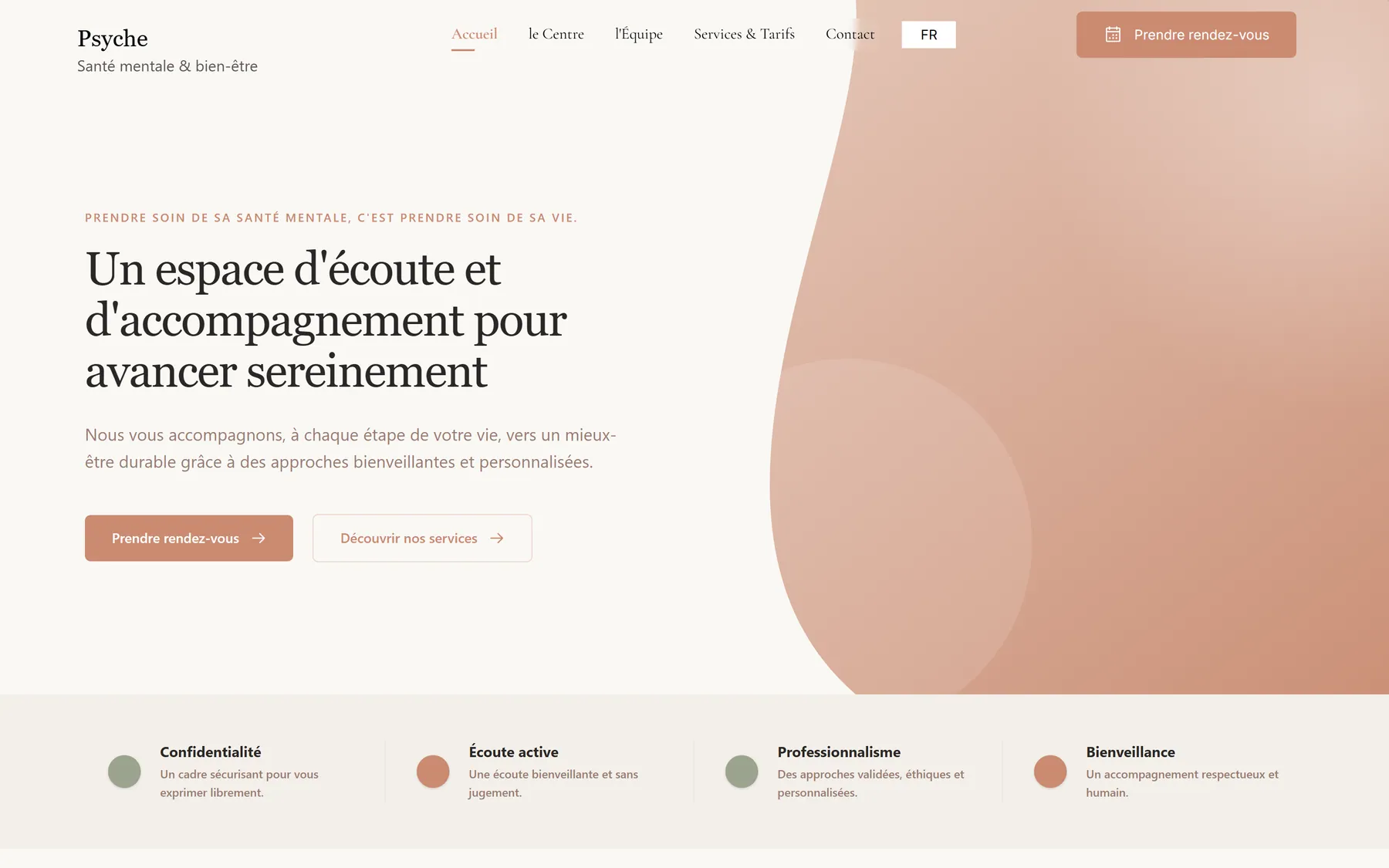
A public site delivered with the platform and edited from the admin: pages, colours, fonts, logo, favicon, opening hours, tariffs, team, blog and policies, in up to seven languages.
Each therapist sets a personal passphrase. It derives a key inside the browser that unlocks their private key. Everything clinical is sealed with that key before it is sent. What the database stores is ciphertext.
validates shape & recipients, never decrypts
{ v:1, iv, ct, wk }Every note body, private reflection, timeline event, relationship entry, clinical summary and AI summary gets its own AES-GCM-256 key, wrapped with RSA-OAEP-2048 for each authorised reader.
The key pair is generated on the therapist’s device. The private key is wrapped with PBKDF2-SHA256 at 310,000 iterations. The passphrase is never stored and never transmitted.
Every record is also sealed for the clinic’s owners, cryptographically, not by an access flag. A forgotten passphrase means an owner can re-encrypt the notes for the therapist.
The server checks the shape of every envelope and refuses a write that is missing a required reader. It never holds a key that could open one.
Ask for the passphrase on every reload, keep the key for the tab, or until sign-out. Lock now drops it from memory instantly.
Nothing is readable unless a rule says so. Clinical collections are read-only for clinicians and closed to client writes entirely.
Secretaries get the same patients, appointments and payments, and none of the notes are even loaded for them.
Deleting a patient hides them everywhere and stops every reminder, with a fortnight to undo. Then a cascade removes notes, summaries, appointments, ledger rows and packs, children first.
Financial exports name patients by initials and a derived dossier number, never by name.
Google Calendar entries carry a generic title, private visibility and no attendees. The refresh token is encrypted at rest with a separate server key.
HTTP-only, same-site strict cookies with a five-day life, CSRF-protected sign-in, allowlist-gated access and instant lock-out of a suspended colleague.
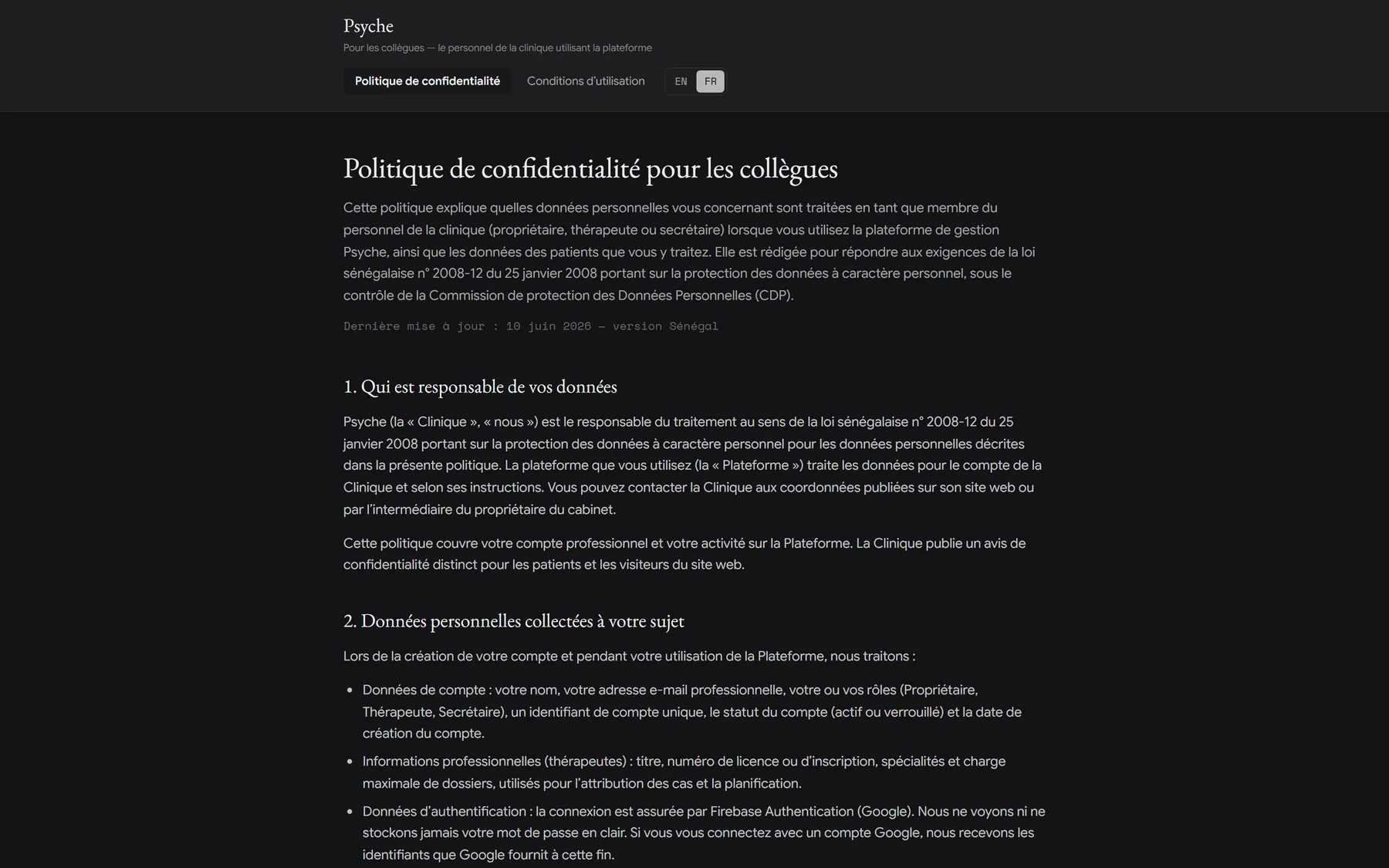
Staff privacy and terms pages ship in EN/FR with a switch for Senegalese (CDP) or European (GDPR) regimes.
The dossier lists every past session and asks for the note that belongs to it. A session nobody wrote up shows as “to write”. A run of cancellations stays visible, because that too is clinical information.
First session, follow-up, assessment and closing. The first note on a case defaults to the intake kind, the rest to follow-up.
The shareable account of the session and the therapist’s private reflections, encrypted separately.
Notes stay drafts until signed with a legal timestamp. The dashboard counts unsigned and missing notes as “notes to write”.
Bold, italic, underline, strike, lists. ⌘/Ctrl+B, I, U, E, K and Shift+7/8, rendered safely.
Dated events, with an impact level from low to traumatic, linked to the people involved.
Family, partners, friends, employers, schools and institutions around the client, each with a relationship quality.
Entries written by hand and entries extracted by Psyche Desk are labelled, with the model tag and the notes they came from.
Only the author can overwrite or delete their note. Owners can remove extracted entries.
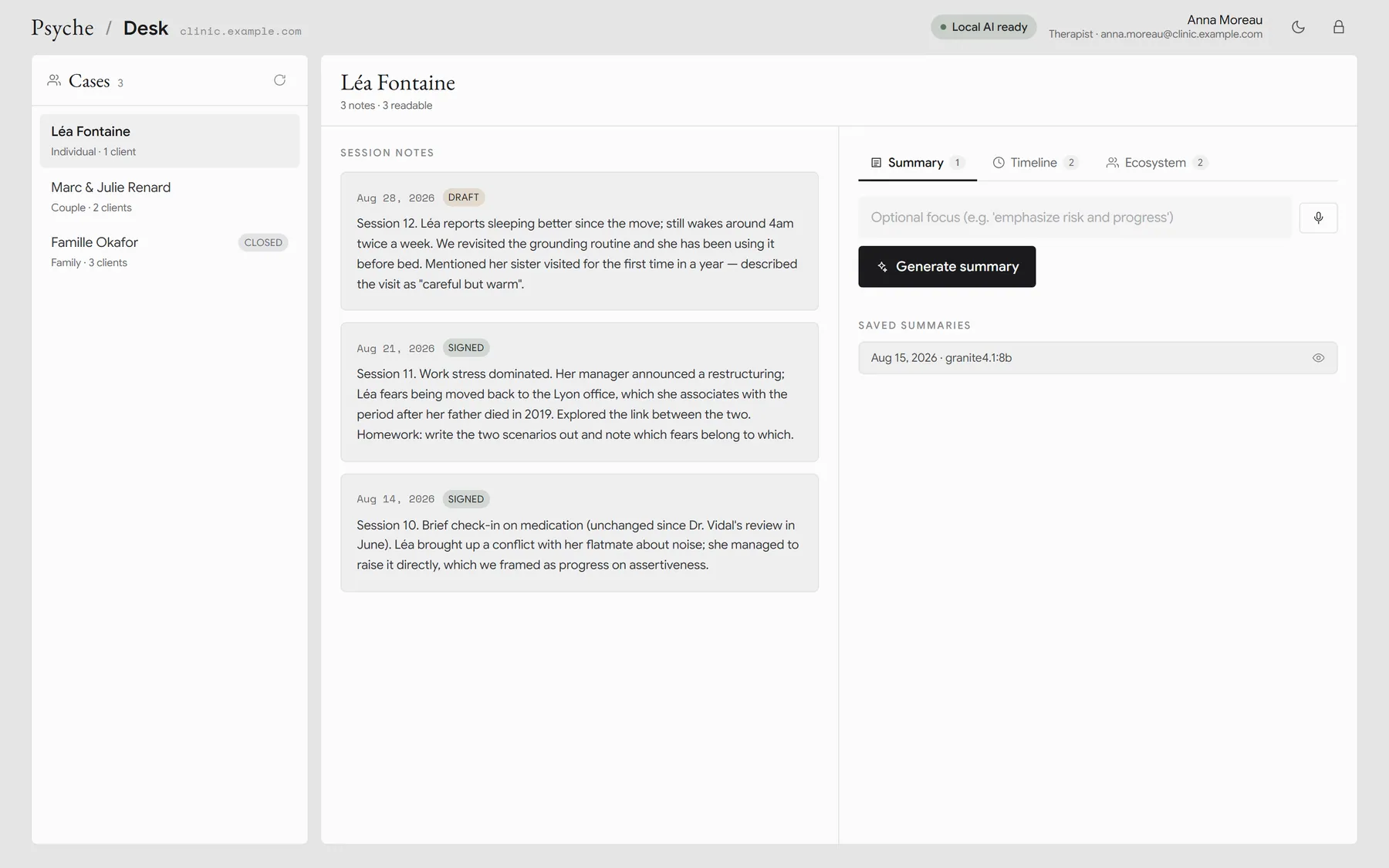
The same workspace in light mode · Demo data
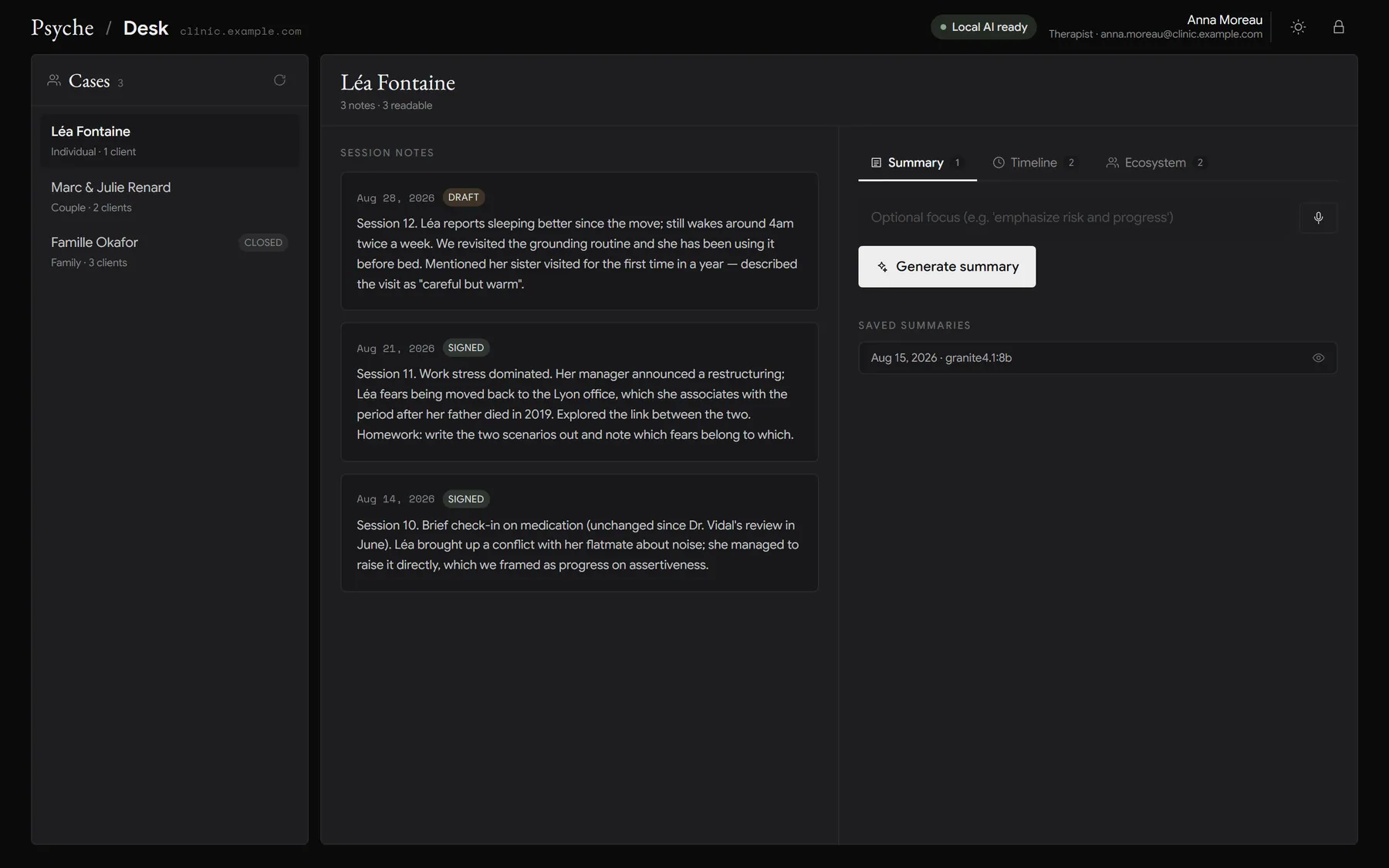
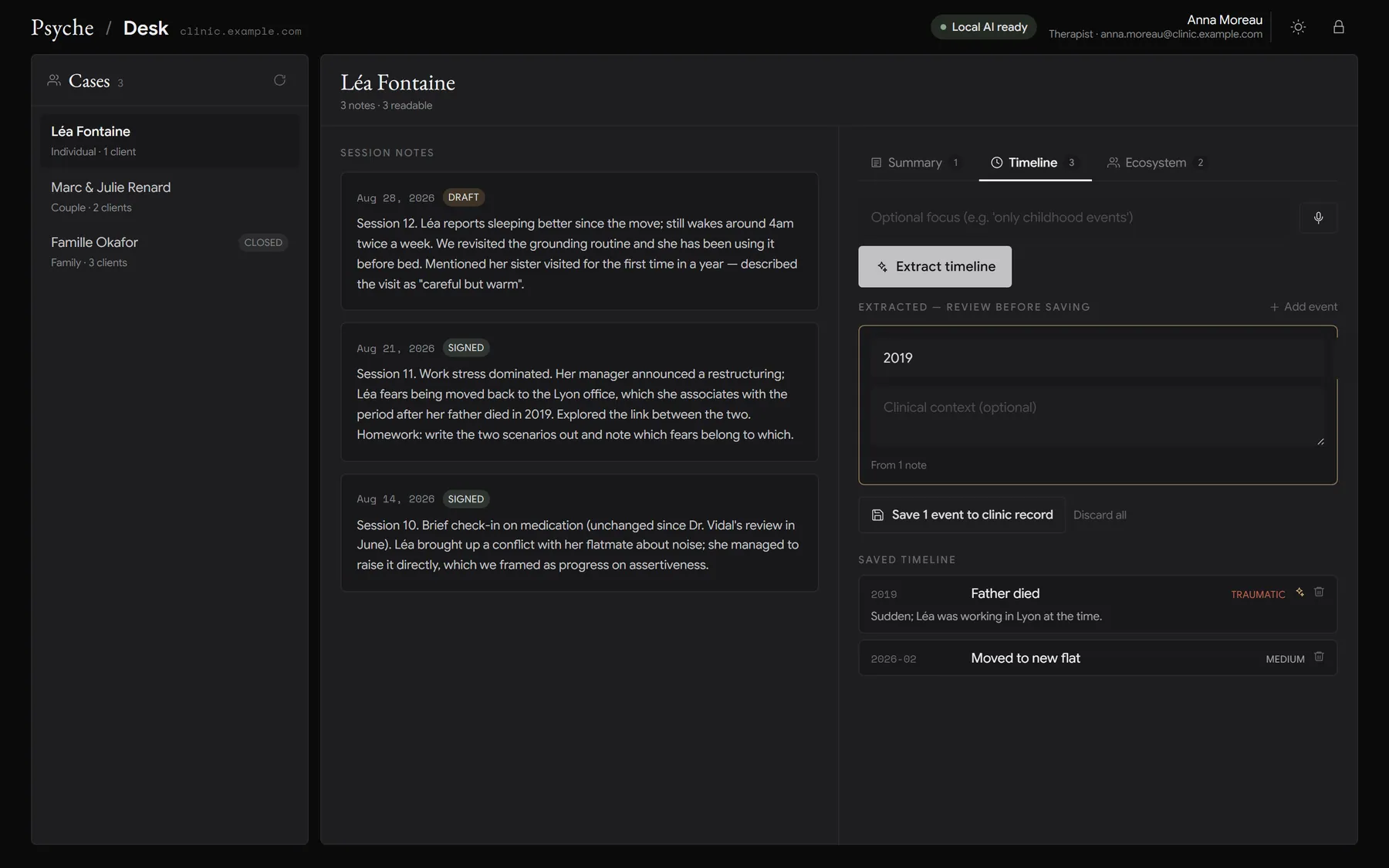
Psyche Desk is a native app for Windows and macOS. It pairs with the clinic’s server, unlocks the therapist’s notes with the same passphrase as the web app, and runs every model on the therapist’s own machine. Decrypted text and audio only ever travel to 127.0.0.1.
Walkthrough: unlock, open a case, generate a summary, extract the timeline and ecosystem, lock. Demo data.
Generate a pairing key on your account page. The desk app checks it against the clinic server and stores it locally. The server keeps only a hash.
The same passphrase as the web app unwraps your private key in memory. Lock drops it, and every decrypted byte with it.
Summary, timeline or ecosystem, from every note you can read, with an optional focus you can type or dictate.
Everything is a draft until you press save. It is then re-encrypted for you and the owners and written back through the clinic server.
Case workspace: decrypted notes, Summary / Timeline / Ecosystem · Demo data
Presenting themes, progress, risks and suggested focus in Markdown, under a prompt that forbids inventing facts, dates or diagnoses.
Dated life events with an impact level, resolved against the date each note was written, sorted chronologically.
People and institutions with relationship label, type and quality. The therapist and the clinic are excluded by rule.
The model must answer in JSON matching Psyche’s exact record shapes, at low temperature. A batch that breaks the schema is reported, not half-saved.
Long cases are processed in batches merged in Go, never by a second model pass: same title is the same event, same name is the same person, in English and French.
Native microphone capture transcribed by a local whisper.cpp server. Audio never touches the disk.
Kokoro text-to-speech, locally, with 17 English voices, so a summary can be reviewed while walking between rooms.
The app downloads and runs its own private Ollama on a random loopback port, verifies the download’s checksum and fails closed if it cannot.
Fast (3B, 8 GB RAM), Thinking (8B, 16 GB) and Ultra (12B, dedicated GPU). It recommends a tier from your memory and free disk.
Once the models are downloaded, summarisation, extraction, dictation and speech need no internet at all.
Decrypted notes, drafts and transcripts live in memory only, cleared on lock or case change. Only the pairing config and the model weights are stored.
Light and dark, the clinic palette and fonts. It reads as another surface of the same product.
Week, month and year views for each therapist, a read-only clinic-wide agenda for the front desk, and a booking dialog that knows about rooms, packs, currencies and recurrence. Patients hear from the clinic over WhatsApp and email, and their replies come back to the calendar.
Owners draw the premises floor by floor. Bookable rooms appear in the dialog with clinic-wide conflict detection and live occupancy.
Weekly to monthly, 2 to 52 occurrences, DST-safe and month-end-safe. One occurrence can move without touching its siblings.
Converting a referral creates the patient, the case and the first session together.
Meetings, workshops, conferences, admin and personal time on the same grid, so availability is real.
Best-effort mirroring that never blocks a booking, with generic private titles.
WhatsApp template messages with quick-reply buttons and AWS SES email, at several lead times, in the patient’s language.
Nothing goes out between 22:00 and 08:00 clinic time. A lead landing in the window shifts to its edge, and the sender refuses to run inside it as a backstop.
An idempotency ledger claims each (appointment, recipient, channel, lead) before sending. Re-running the job can never double-send.
Lifecycle confirmations sent the moment staff act, or queued until morning and collapsed so the patient reads what is true by then.
A confirmed or cancel-requested reply is recorded on the appointment and raised to staff to acknowledge. A human decides.
Each patient opts in to WhatsApp and email separately, with a preferred language. Clinic-wide toggles sit above.
Appointments to settle, waiting on payment, notes to write, urgent intakes and referrals waiting, all on the home screen.
Secretaries run a parallel view of the clinic: contacts, appointments, settlements and payments for every patient, and not one line of clinical text. A secretary who follows a clinical link lands on the front-desk file for that same patient.
Every request in one searchable list, filtered by channel, status, urgency, gender and modality, with a detail pane for the one you are handling.
SMS, WhatsApp, phone, email, web form, walk-in and other, with one-click call, text, email or WhatsApp back.
New, screening, referred, scheduled, waitlisted or closed, with urgency, clinical tags, screening notes and a therapist assignment.
Every contact attempt with its outcome: no answer, voicemail, message left, reached, bounced.
Came, cancelled by patient, by therapist or missed, charge it or not, paid or waiting, and the tender used.
An unguessable derived number lets staff refer to a patient out loud or on a form without naming them.
Nothing is typed twice. Pricing, packs, settlements and payments flow from the schedule into a ledger the owner validates, then into analytics and a spreadsheet the bookkeeper can open.
Individual, couple, group and workshop tiers, unlimited clinic-defined offers, and free-form discounted rates for students or first sessions.
Pre-purchased bundles drawn down per session at the price captured on purchase. A cancelled session hands its seat back.
Half of the price that appointment carried, never the list price. A pack patient loses a whole seat, stated as a clinic rule.
A negotiated amount, currency and reason, prefilled into every booking for that case.
Each session keeps the currency it was billed in. The owner authors exchange rates, and anything without a rate is reported separately rather than guessed.
Cash, Wave, Orange Money, card, whatever the clinic accepts, offered at booking and settlement.
Monthly revenue validated vs pending, sessions, new and returning patients, retention, average per session, revenue by offer and by therapist, pack liability as deferred revenue, at-risk patients.
Seven sheets with frozen headers, filters and totals, periods resolved on the server, patients pseudonymised, in all seven languages.
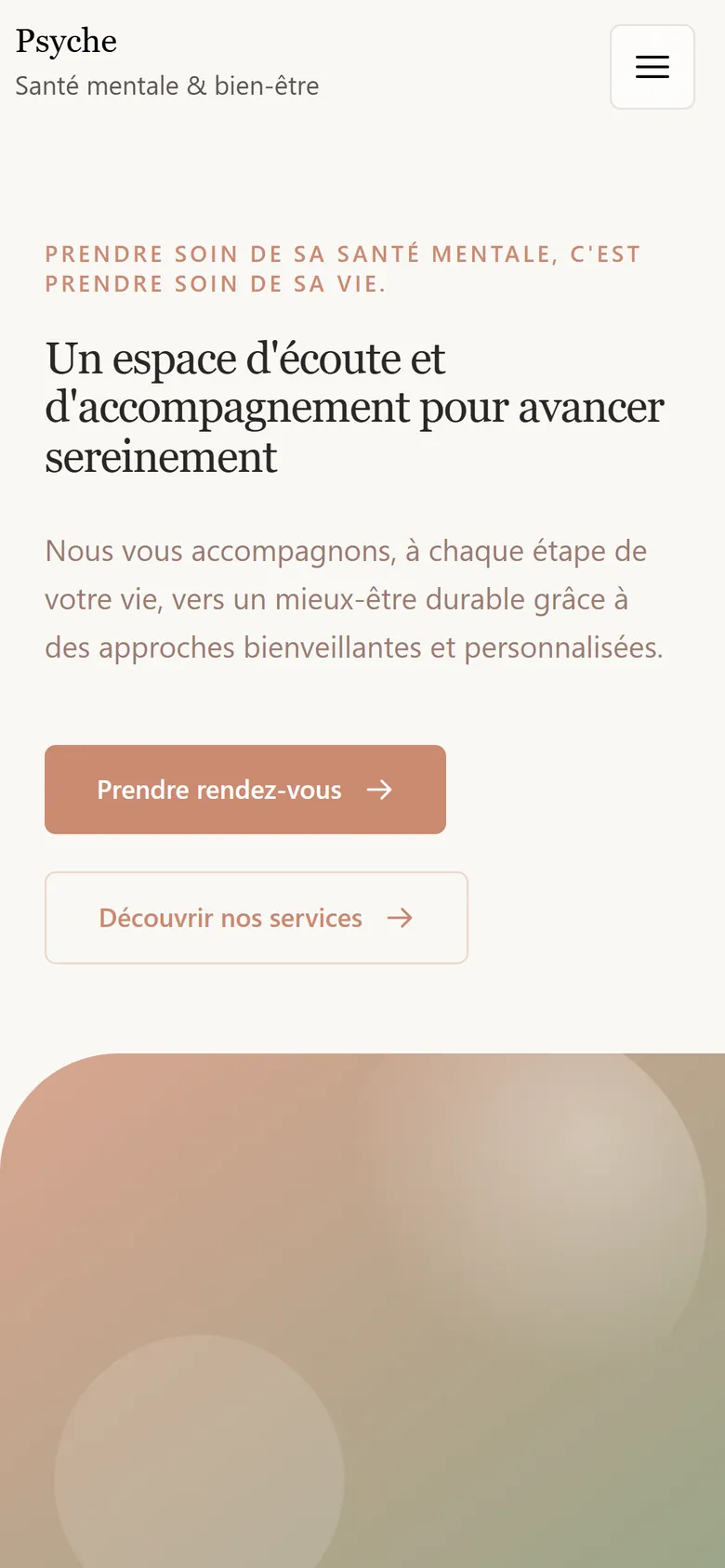
The public site ships with the platform and is edited from the admin, page by page and word by word. Colours, fonts, logo, favicon, photos, tariffs, team, opening hours and policies are the clinic’s. Shown here: the default template as delivered, before a clinic adds its photos.
Edit as many drafts as you like, preview each with a shareable link, publish one, or take the site offline.
Open a draft preview, switch to mobile, tablet or desktop, click any text or image on the page and change it right there.
Palette, per-block colour overrides, four font slots from Google Fonts, logo upload, favicon generated from the logo.
Home, the centre, services with tariffs and cancellation rules, team with founders, contact, privacy and cancellation policy, and a blog that only appears once something is published.
Headings, text, quotes, images and dividers in Markdown, per language, with cover framing and separate mobile crops.
Auto-translate empty languages, draft a page from a brief, propose a palette, or ask the assistant to change the site. It has no access to patient records.
EN, FR, DE, NL, ES, PT, IT. Each clinic chooses which ones its visitors see.
Every upload becomes three WebP sizes with focal point and zoom; deleting an image reports and scrubs every place that used it.
A colleague can hold several roles. Every action re-checks who is acting, so a crafted request cannot do what the screen would not allow. Owners are named in the clinic’s configuration and cannot be granted from a button.
Runs the clinic and holds the recovery keys.
CanCarries a caseload and writes the record.
CanRuns the front desk and the intake queue.
CanWho came, who has not paid, which note is still unwritten, which intake is urgent. The day starts from one screen.
The website editor, schedule and front desk never ask for it. You enter it the first time you open a case.
Every screen, label and export, and the CMS preview can render in one language while your chrome stays in yours.
One toggle, remembered per device, on the web and on the desk app.
In the notes and blog editors, and Esc to leave the device preview.
Skeleton screens shaped like the page you are going to, so nothing jumps.
The admin folds into a menu, the public site is responsive with mobile image crops.
Email and password or Google, with password change and re-authentication for sensitive actions.
Every capability in the current build, grouped by where you find it. Nothing on this list is a roadmap item.